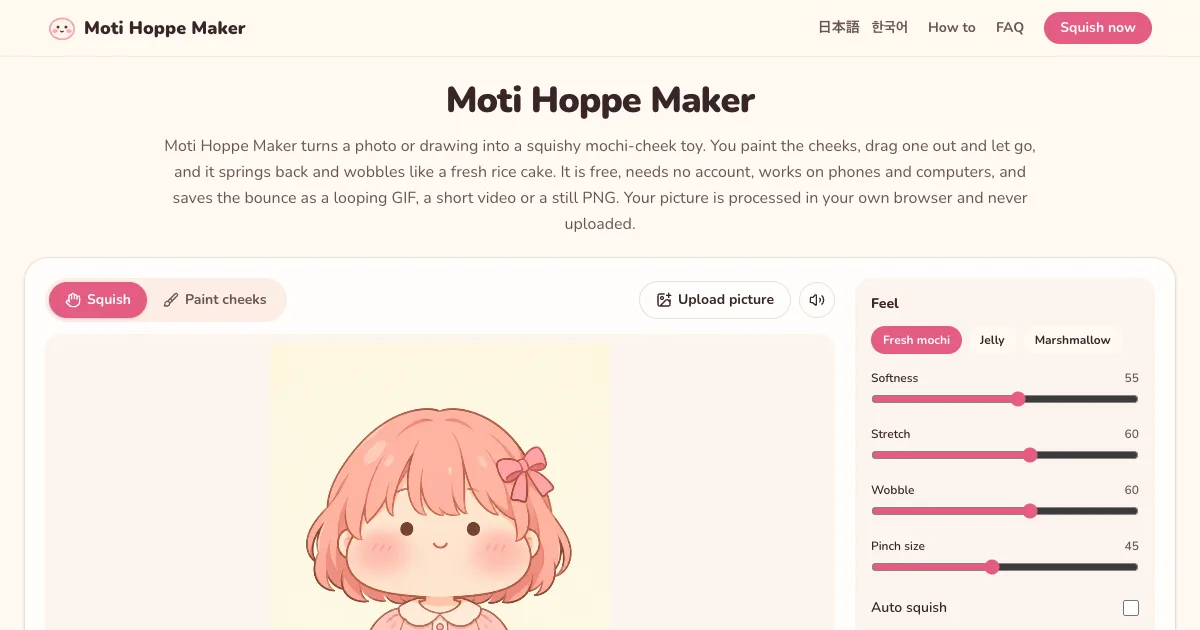
To use Moti Hoppe Maker, open motihoppemaker.net in any browser, upload a photo or a drawing, brush over the cheeks in Paint cheeks mode, then switch to Squish, drag a cheek outward and let go: it snaps back with a rice-cake wobble. Press Record to keep the bounce as a looping GIF of 3, 5 or 8 seconds plus a short video with a boing sound, in the picture's own shape or 9:16 for TikTok, or save one squished frame as a PNG. It costs nothing, asks for no account, and the picture is handled inside your browser rather than sent to a server.
What the Moti Hoppe Maker trend is
"Moti hoppe" is a playful spelling of the Japanese for mochi cheeks: cheeks so soft they stretch like a rice cake and spring back. A small Japanese cheek-pulling toy started it, and from mid-November 2026 people on TikTok and Instagram were pulling the cheeks of their selfies, their pets and their own drawn characters and posting the wobbly loops. Moti Hoppe Maker is an English-language web version of that idea: no app to install, and it works the same on a phone and a laptop.
What you need
- A picture that shows a face. A selfie, a pet, a baby photo of yourself, an anime character you drew. JPG, PNG, WebP or GIF files up to 25 MB.
- A browser. Chrome, Safari, Edge or Firefox, on a phone, a tablet or a computer.
- Nothing else. No sign-in, no download, no payment.
Step by step
1. Load a picture
Tap Upload picture, or drag a file from your desktop straight into the canvas, or press paste after copying an image. To see how it behaves first, try one of the built-in samples: a cartoon girl, a Shiba puppy or a baby seal.
2. Paint what should move
A new upload opens in Paint cheeks with two guessed spots already marked. Brush over every part that should stretch: the round area under each eye, not the eyes themselves. Use the eraser on anything that must stay still, such as the mouth, glasses or a strand of hair crossing the cheek. Only painted areas move; the rest of the face holds its place, which is why it reads as a pinch and not a smeared photo.
3. Choose how soft it is
Under Feel, the three presets set the character of the bounce:
| Preset | What it feels like | Good for |
|---|---|---|
| Fresh mochi | Soft pull, a few calm wobbles | Selfies and most faces |
| Jelly | Loose, jiggly, keeps shaking | Pets and chubby chibi art |
| Marshmallow | Firmer, springs back quickly | Small faces, subtle loops |
The four sliders fine-tune it: Softness (how easily it gives), Stretch (how far it goes), Wobble (how long it shakes after you let go) and Pinch size (how much of the cheek your finger grabs). Reset feel puts them back.
4. Pull and let go
Change to the Squish button, grab a cheek and pull it away from the face. The further you pull, the harder it resists; release and it springs back. On a phone, put two fingers on the screen to pinch both cheeks at once. Tick Auto squish if you want the tool to keep pulling by itself while you record.
5. Record and save
Set the length first, 3, 5 or 8 seconds, then the frame for the video: Picture shape keeps your picture's proportions, 9:16 for TikTok puts it on a tall frame with a blurred backdrop. Press Record GIF + video and keep squishing until it finishes. The tool hands back two files: a GIF that loops and a short clip with a boing each time a cheek is released (mute it with the speaker button before recording if you want silence). Save a squished still gives you a PNG with both cheeks pulled. Untick Small site name in the corner for a clean file.
Which pictures bounce best
- Face to the camera, both cheeks showing. A profile shot leaves only one cheek to grab.
- Room around the head. A face cropped tight to the edges has nowhere to stretch into.
- Round cheeks. Babies, hamsters, seals, puppies and chibi characters wobble the most convincingly.
- A sharp image. 512 pixels or more on the short side keeps the GIF crisp.
- Clear cheeks. Hands, hair and scarves over the cheek get stretched along with it; erase them from the painted area.
Posting it
- TikTok and Reels: use the 9:16 video so it fills the screen, and leave the boing on; it is half the joke.
- Group chats and comments: the GIF loops forever and plays without a tap.
- Profile pictures and stickers: the squished PNG works as a still reaction image.
- Your own art: artists often post the original drawing first and the squish second.
If something goes wrong
- Nothing moves when you drag. Nothing is painted yet. Go back to Paint cheeks and brush the cheeks until they turn pink.
- The eyes or mouth stretch too. The brush went too far. Erase those areas and keep the paint on the soft part of the cheek.
- It looks smeared, not bouncy. Lower Stretch, or switch to Marshmallow.
- The GIF looks blurry. The source picture was small. Use a larger photo or a higher-resolution drawing.
- Recording on an old phone is slow. Pick the 3-second length; shorter loops finish faster.