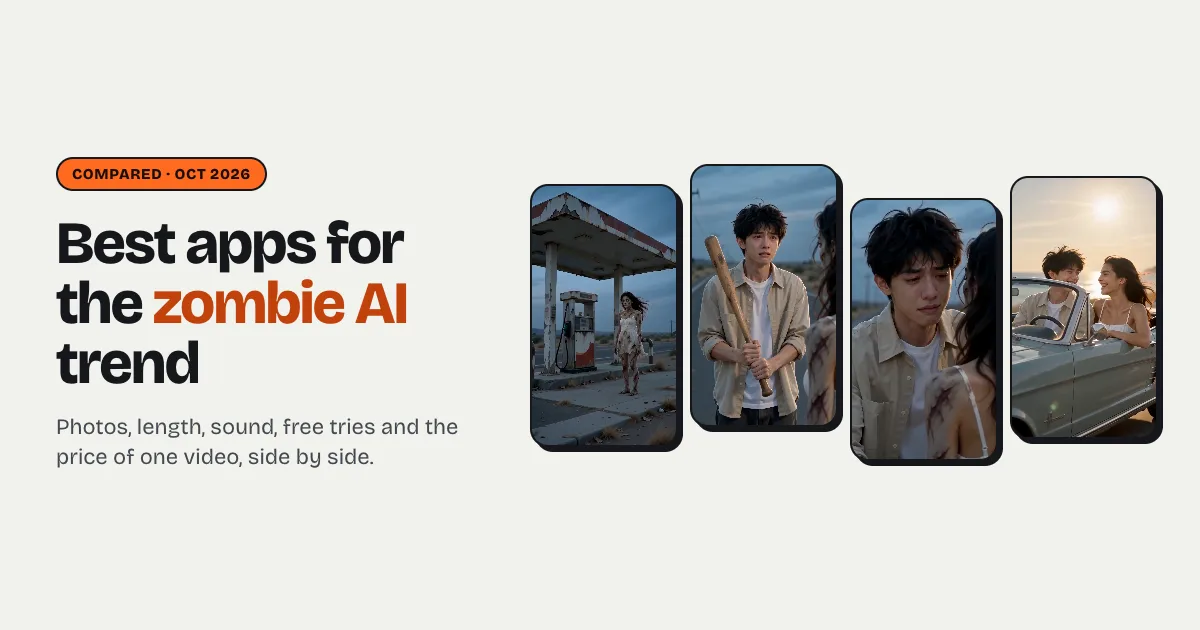


Short answer: no single app owns the zombie AI trend. The tools that make the full story (one person turns, the other can't strike, a hug, a cut to a happy memory) are trend sites with a template built in: Kavel, Zombietrend, Media.io, TrendAI and Raindance AI (us). They differ most on length (5 to about 24 seconds), sound, whether you get a free try, and price for one video ($7.99 to $9.99 for a single video where a price is shown). General video apps such as Kling, PixVerse or Higgsfield have no zombie-hug template that we could find: you'd write the prompt yourself.
What should a zombie trend app do?
The trend is a story in four beats, so the first test is whether the tool tells it:
- The turn: someone you love stands there, grey and cloudy-eyed, but clearly still them.
- The hesitation: the other person raises a weapon and can't use it.
- The hug.
- The memory: a match cut to the two of them happy, before it all.
The second test is two people, two photos. A tool that takes one photo can make a zombie, but not the love story. The third is faces: both people must still be recognisable, one of them under zombie make-up. How the trend works, step by step covers the rest.
Comparison table
Everything below is what each tool's own pages said on 7 October 2026. Prices and limits change often, so treat it as a snapshot and check the tool's current pricing before you pay. "Not stated" means the page didn't say.
| Tool | Photos | Length / format | Sound | Free try | One video (USD) | Watermark | How it's made |
|---|---|---|---|---|---|---|---|
| Kavel | 2, one per person (photo 2 can be a pet) | 4–15 s (12 s fits all beats), 9:16, 480p up to 4K | Yes | Yes: 20 credits at sign-in plus weekly check-in credits, up to 2 free videos | $9.99 for one 12 s video; subscriptions from $8.30/month yearly | Free videos carry a small corner mark; paid are clean | Generates a new scene from the four beats |
| Zombietrend | 2 (human + zombie; a pet works too) | 15 s, 9:16 or 16:9, 480p or 720p | Yes | Not stated | Starter $9.90 for 300 credits (one 720p video is 300) | Not stated | Fixed four-moment story; about 10–15 minutes to render |
| Media.io | 2 (you and a consenting adult) | 10 s, 16:9 | Ambient sound only: no music, no dialogue | Free plan with daily check-in credits | Not stated on the trend page | Free exports watermarked; paid 1080p without | Generates a new scene, shot by shot |
| TrendAI | 2, two different people | About 24 s, 2:3 | Yes, the original clip's music | Not stated | Priced in credits, no per-video dollar price | No watermark | Fixed template: keeps the original clip's moves and audio, swaps the people |
| Raindance AI (us) | 2, one per person | 8 s default, 12 or 15 s for all four beats; 9:16, 16:9 or 1:1; 720p | Yes, soft piano, no dialogue | No: new accounts start with 0 credits | $7.99 for 8 s, or $3.99 as a first order (50% off the first credit pack) | No watermark | Generates a new scene; three settings, each with its own memory |
Two notes on the table. A site that keeps the original clip (TrendAI) gives you the exact look people recognise, but your faces are swapped into someone else's video. A site that generates a new scene (Kavel, Media.io, us) gives you your own version, which also means more variety and occasional retries. Neither is better; they're different products.
What about CapCut, Kling, PixVerse or Higgsfield?
We found no zombie-hug template on CapCut or Dreamina when we checked. Vidu and Pollo AI have single-person "zombie transformation" effects: they turn one person into a zombie, but there's no second person, no hug and no memory. Kling, PixVerse and Higgsfield are general image-to-video tools: they can make a zombie clip if you write the whole prompt, upload both photos as references and accept a few failed tries. If you already pay for one of them, that's the cheapest route. If you don't, a trend site does the story for you.
One practical warning for do-it-yourself prompts: leave the gun out. Video models often block clips with firearms or violence, and a refused render still costs time. A raised bat that falls, or empty hands, carries the same hesitation.
How do you choose?
Stop at the first yes.
- Do you want to try it for free first? Kavel is the only one with a clear free allowance (up to two watermarked videos). Media.io's free plan has daily credits for a shorter, landscape version.
- Do you want the exact original clip with your faces in it? Pick a fixed-template site such as TrendAI.
- Is it for TikTok or Reels and you want vertical, with sound, at the lowest price? Raindance AI is $3.99 for a first video and $7.99 after, vertical by default, with a piano and no watermark.
- Do you want 15 seconds in one go without choosing settings? Zombietrend's clips are always 15 seconds with sound.
- Do you only have one photo of the two of you together? Crop it into two photos, one face each: two separate photos keep both faces apart, which is what makes the story work.
What to check before paying anywhere
- Is it the story or just a filter? Look for two photo slots and the four beats in the examples.
- Length. Five seconds only fits the turn and the hug. Twelve or more is what the full trend needs.
- Sound. Some clips are silent or ambient-only; that's fine if you'll add a trending sound in TikTok anyway.
- Watermark on the paid tier. Free tries are usually marked. Check that the paid one isn't.
- What happens to the photos. You're uploading someone else's face too. Ours are used only to make the video, and originals are deleted after 30 days.