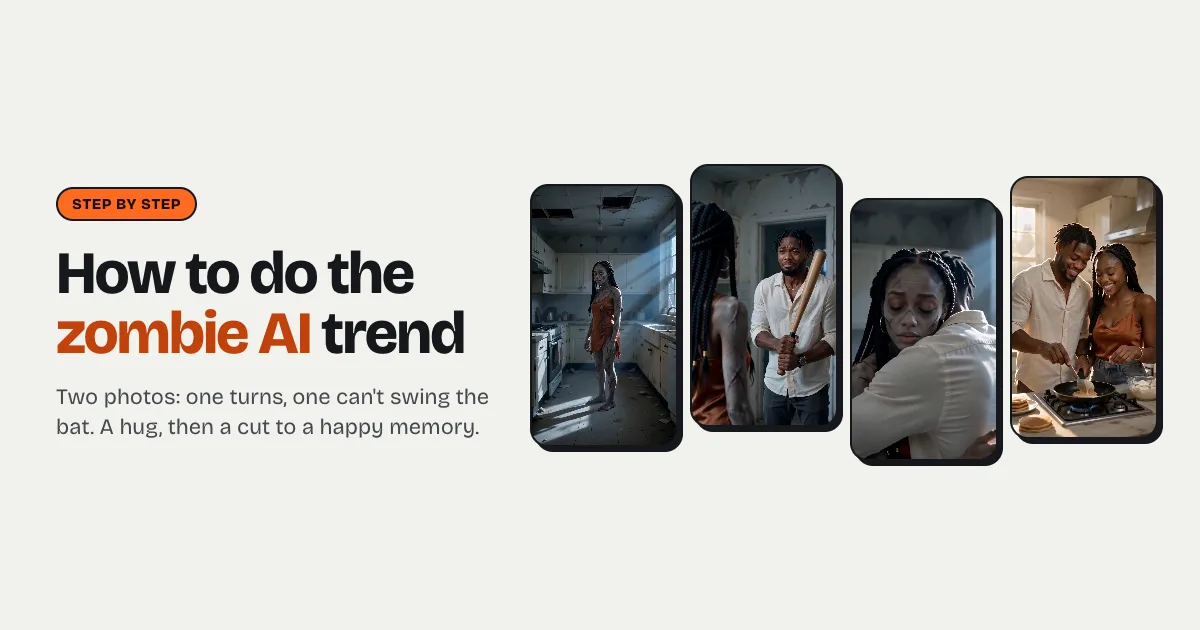


Short answer: to do the zombie AI trend, upload two photos to a generator that supports it, such as the zombie AI trend page on raindance-ai.org: photo 1 is the person holding the bat, photo 2 is the one who has turned. Pick a setting and press Make. In two to five minutes you get an 8-second, 9:16 clip with a soft piano: the zombie stands in a dusty room, the other person raises a bat and can't swing it, drops it, hugs them, and a match cut lands on a happy memory from before. It costs $3.99 for your first video and $7.99 after that.
What is the zombie AI trend?
It's a short love story told in four beats, and the beats are the whole point:
- The turn. Someone you love stands still, grey-skinned and cloudy-eyed, in an abandoned place. It's clearly them: same face, same hair, same clothes, only ruined.
- The bat. The other person raises a weapon with shaking hands, eyes wet, and can't bring it down.
- The hug. They drop it and walk into a tight embrace with the zombie.
- The memory. A match cut from the hug to the two of them, healthy and laughing, in the same place before it all.
It spread on TikTok and Reels around the start of October 2026, just ahead of Halloween; who posted the first one isn't documented. People make it with partners, best friends, siblings, parents and grandparents. The reason it spreads is the last cut: the comments are full of people saying they didn't expect to cry at a zombie video. Our zombie AI trend page has examples.
What do you need?
- Two photos, one person in each. One adult per photo, face clearly visible and toward the camera, even light, chest-up or waist-up. Photo 1 is the one who holds the bat; photo 2 is the one who turns. A good photo matters more than any setting: the model can only keep a face it can see.
- Consent from the other person. It's their face becoming a zombie. Ask first, and never use photos of children or of people who haven't agreed.
- A Google account or an email address, to sign in.
How to make the zombie AI trend video, step by step
Step 1: Open the zombie studio and add both photos
Go to the zombie AI trend page. The studio there is already set to the zombie story and takes exactly two photos. Add photo 1 (holds the bat) and photo 2 (becomes the zombie). Swapping them swaps the roles, so decide who turns before you upload.
Step 2: Pick where it happens
There are three settings, each with its own memory at the end:
| Setting | The zombie scene | The memory it cuts to |
|---|---|---|
| Abandoned kitchen | A dim, dusty kitchen at dusk, broken window, cold blue light | Cooking pancakes together in the same kitchen, bright morning sun |
| Snowed-in cabin | A wooden cabin at night, one candle, frost on the windows | A snowball fight outside the same cabin on a sunny day |
| Highway gas station | An empty station on a deserted highway at dusk, flickering lights | A summer road trip, laughing in an open car on a coast road |
Pick the one whose memory fits the two of you: the ending is what people remember.
Step 3: Choose the length
The default is 8 seconds, which folds the bat and the hug into one shot. Choose 12 or 15 seconds in Video settings if you want all four beats with room to breathe: the turn, the bat, the hug, then the memory. Longer clips cost more credits, and the button always shows the exact cost.
Step 4: Make it and wait
Press Make my zombie video. Sign in with Google or an email when asked; your photos are kept, so nothing is redone. New accounts start with 0 credits: one video is $7.99, or $3.99 because your first credit pack is 50% off. Rendering takes two to five minutes, and you can leave the page: the clip is saved under My videos. If a render fails, the credits come back automatically.
Step 5: Post it
Download the MP4 (no watermark) and post it to TikTok, Reels or Shorts. It already has a soft, sad piano, so you can post it as it is, or lay a trending sound over it in the app. Switch on the AI-generated label: TikTok requires it for realistic AI video, and people are kinder in the comments when nobody is guessing.
Why is there a baseball bat and no gun?
Because video models block clips with guns, blood and attacks, and a blocked render is a wasted wait. The trend's emotion doesn't need violence: the moment is the hesitation, not the weapon. So the person in photo 1 raises a wooden bat and lets it fall, and there's no blood, no bite and no attack anywhere in the clip. If you write your own prompt in a general video app, keep the same rule or expect refusals.
Can you do the zombie AI trend for free?
Not here: every video is a real render that costs money, so new accounts start with 0 credits and the cheapest video is $3.99. Some apps give sign-up credits that cover one try; general image-to-video apps (Kling, Hailuo, PixVerse and others) can make a zombie clip if you write the whole prompt yourself and accept trial and error. What they don't do out of the box is the story: two separate photos kept as two people, the bat that never swings, and the match cut to a memory.
Tips for a better zombie video
- Choose who turns on purpose. The trend lands hardest when the person who turns is the one people would least expect: grandma, the gym-obsessed brother, the partner who hates horror films.
- Use photos with similar framing. Two chest-up photos in daylight give the model the most to work with.
- Go to 12 seconds for the full story. Eight seconds is enough for TikTok, but the four-beat version is the one people rewatch.
- Write the caption as a dedication. "If you turned, I still couldn't" does more than any hashtag.